
Uptrends uses a credit-based pricing model to calculate the cost of different monitoring services. Credits are required to create, configure, and monitor your websites. Understanding how credits work helps you plan your monitoring strategy and manage costs effectively.
Credits
Credits are the unit of measurement Uptrends uses to calculate pricing for monitors with more frequent checks. They are calculated based on the monitor type and configuration. Monitors with more frequent checks or with advanced configurations will use more credits, while simpler monitors use fewer.
Calculate credits
Uptrends does not compute your credits every time your monitor runs or performs a check. It calculates credits based on:
- Monitor type and checks
- Monitor configuration
Monitor type and checks
Each type of monitor uses credits differently, depending on what it checks and how the check is performed.
Each type of monitor uses a specific credit type:
| Credit type | Used by (monitor type) | Credit calculation |
|---|---|---|
| Uptime credits | Uptime monitors (HTTPS, DNS, SSL, and others) that check the availability of your web services. | Consumes one credit per monitor. For more details, see Uptime monitor credits.
|
| Browser credits | Browser monitors (Full-page checks) that completely verify your website’s page load and performance on an element-by-element basis. | Consumes one credit per monitor and the price for one credit depends on the check interval. For more details, see Browser monitor credits.
|
| API credits | API monitors, such as multi-step API and Postman monitors, that verify API requests and responses. | Consumes one credit per HTTP request. For more details, see API monitor credits.
|
| Transaction credits | Transaction monitors that simulate user journeys. | Consumes credits per page load, waterfall, screenshot, and filmstrip. For more details, see Transaction credits.
|
For more details, see Monitor types and Monitoring results overview.
Monitor configuration
Some monitor settings also affect how your credits are consumed. For example, shorter check intervals require more frequent checks. Enabling other advanced monitor configuration adds extra processing and data collection, which also impacts the number of credits used.
Check interval
For browser monitor types, the cost of a credit depends on the check interval, which is the frequency of monitor checks. For detailed calculations, see Calculate browser credits.
Monitor mode
Your total credits depend on your monitor mode settings:
- Production mode — monitors that actively run and use credits.
- Staging mode — monitors that actively run and use credits. They do not send alerts and do not impact the uptime and SLA performance of your account.
- Development mode — monitors that are inactive and do not use credits until you’re ready to activate them. Use this mode to test and configure monitors.
For more details, see Monitor mode.
Manage credits
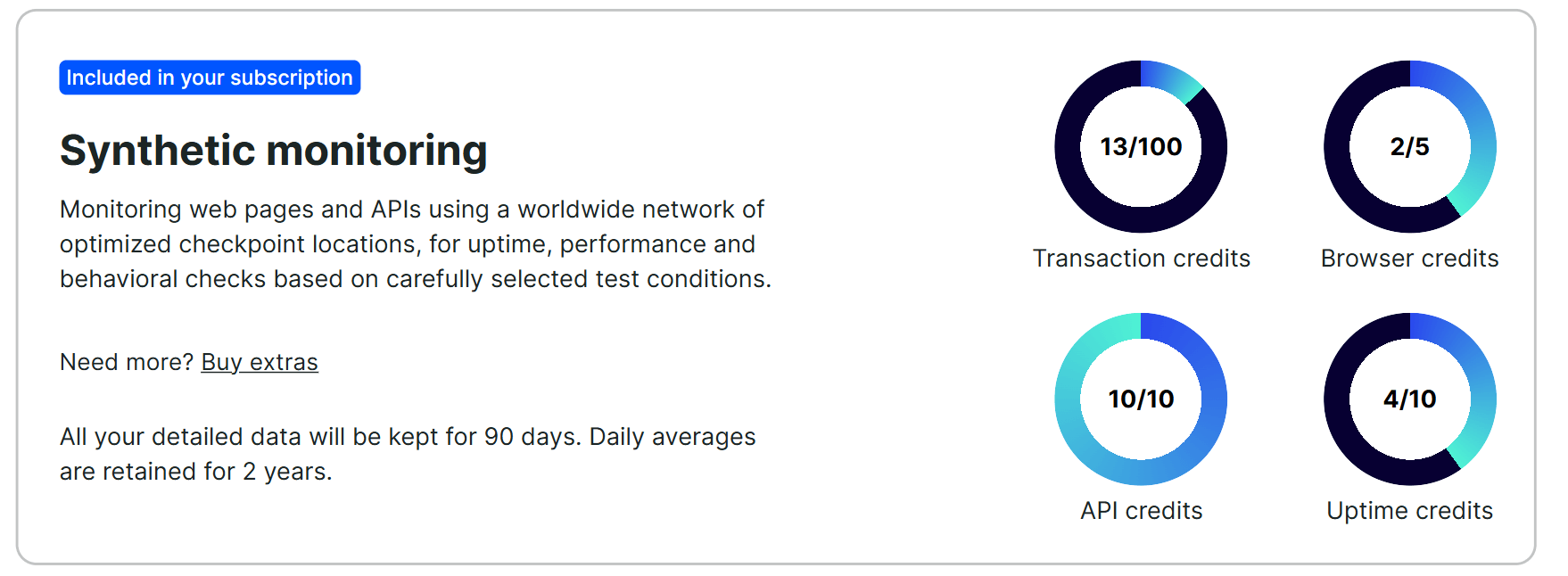
You can view your credit status on the Subscriptions page. The page shows you a donut chart, displaying the number of credits used out of the total credits purchased for each monitor type.
If you don’t have enough monitor credits, you can easily purchase more or just create and run your monitors in Development mode. To buy more credits, see Add more credits.
Troubleshooting
If you encounter any issues or need further assistance, contact our Support team.