
Uptrends integrations allow you to automatically receive alerts and notifications whenever your monitors detect an issue, helping you respond faster and minimize downtime. By configuring integrations, you can ensure that the right team or system is notified through the most effective channel for your workflow.
Uptrends supports three types of integrations:
-
Default integrations — built‑in options you can use immediately, such as phone calls (voice alerts), SMS messages, and email notifications. They are ideal for straightforward alerting where no additional setup is required.
-
Third-party integrations – connect your Uptrends account to external collaboration or incident management tools such as Slack, Microsoft Teams, or PagerDuty. This allows your teams to receive alerts directly within their existing communication platforms, streamlining incident response and reducing the need to constantly monitor the Uptrends dashboard.
-
Custom integrations – for advanced workflows, Uptrends lets you create integrations using templates or from scratch, sending alerts to your own systems using webhooks or custom scripts. This is useful for automating complex operations, triggering additional workflows or integrating with internal systems.
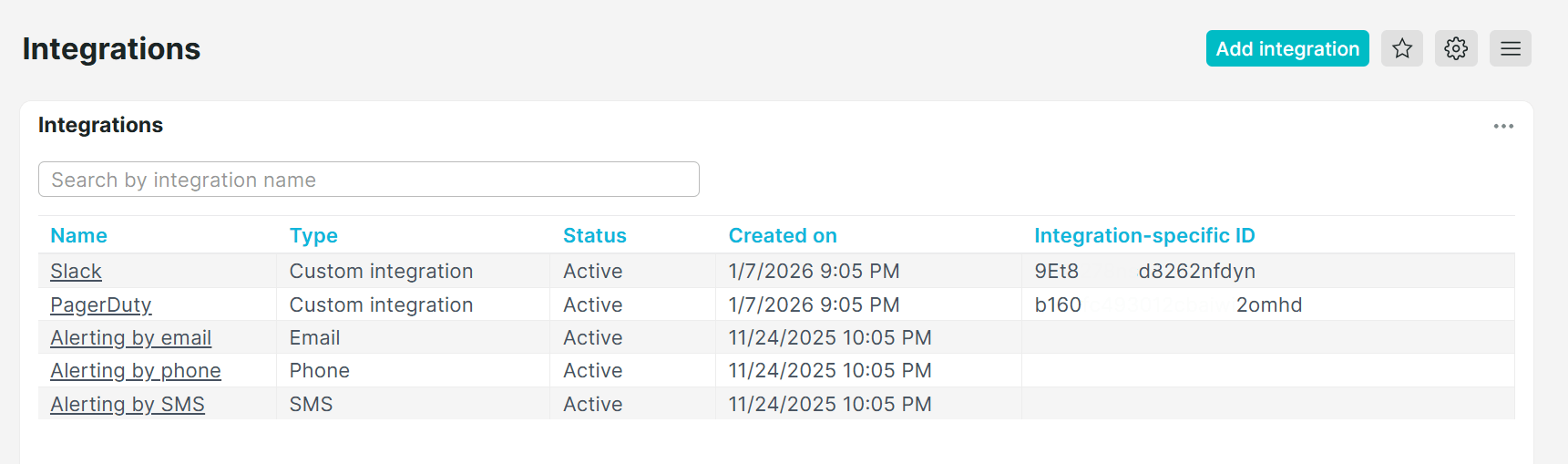
After setting up integrations, you can view and manage all of them in one place. The Integrations page shows the type, status, IDs, and creation date for each integration. Use the filter to easily find and manage specific integrations by name or ID.
Integration types
- Custom integrations
- AlertOps
- Microsoft Teams
- Opsgenie
- PagerDuty
- Slack
- Splunk On-Call
- StatusHub
- Statuspage
- Zapier
Integration setup
- User-defined functions — functions that process and transform data collected by a monitor to determine when an issue occurs. When an error is detected, alert definitions and integrations can be used to notify the right team members.
- Integration permissions — set access right to manage integrations.
Troubleshoot
- Testing alert messages — validate your integration connection by sending a test alert message.