
UPDATE
SEP 2024
#Updates to Private locations
We are happy to announce that the Private locations menu no longer has the Beta label, and is now available for general use.
ITRS acquires IP-Label. Read the press release.
See the latest features and product updates in Uptrends
View the API changelog and reported issues in the Incident log.
UPDATE
SEP 2024
We are happy to announce that the Private locations menu no longer has the Beta label, and is now available for general use.
UPDATE
AUG 2024
Recently, Microsoft announced the retirement of Office 365 connectors within Microsoft Teams. Following this announcement, the Uptrends existing integration with Microsoft Teams will still continue to work until 31 December 2024. Before the said period, stay tuned for our advisory regarding the replacement updates.
Starting 15 August 2024, all newly created Microsoft Teams integration should follow the latest Workflow set-up. The previous approach will no longer be available for use.
UPDATE
AUG 2024
Along with the current Multi-step API, Webservice Http and Webservice Https options under API monitor types, we’ve launched the newest Postman API monitor type as its latest addition.
This feature allows you to maximize API checks by running a Postman workspace collection on the Uptrends checkpoint network. Test the behavior and performance of your APIs with the generated results.
UPDATE
JUL 2024
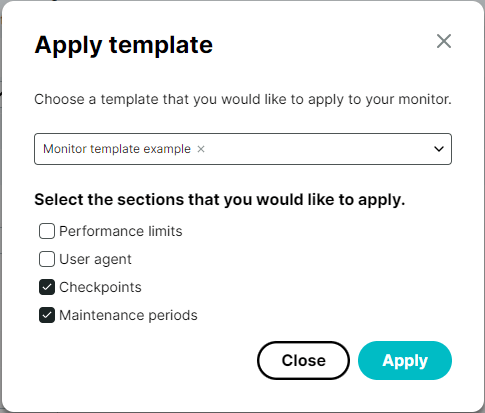
Monitor templates can be used to apply certain monitor settings to several monitors or monitor groups at once. We are now adding the option to set the user agent option, which applies to most monitor types.
Additionally, users can now apply a monitor template directly in the settings of existing monitors, or when creating a new monitor. This gives users the option to set certain settings, such as any (recurring) maintenance periods or a checkpoint selection, according to a predefined template, with a few simple clicks!
UPDATE
JUL 2024
We’ve expanded logging to the Audit log (available under ‘Account setup’ in the menu). The audit log will now contain additional entries, to do with updates to and by Operators in the account, such as: