
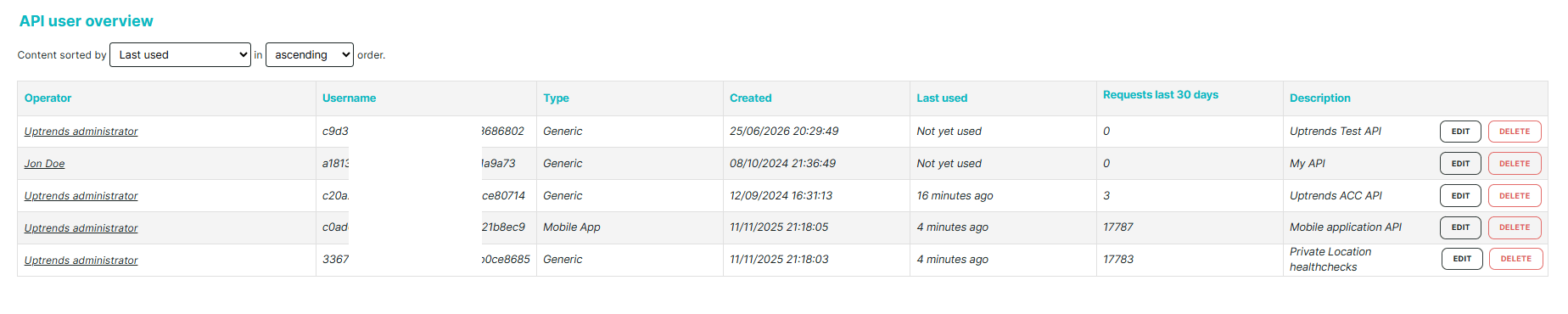
The API user overview is available in the User Management hub. This overview lists all your operators' API information, in addition to the existing individual operator’s API information in the API management tab:
To open the page, use either of these paths:
- Go to Admin > Operator groups > View all API users ({amountOfApiAccounts}).
- Go to Account setup > Operators and groups > View all API users ({amountOfApiAccounts}).
Here you can view and sort the following information easily:
- Operator — the full name of the operator using the API.
- Username — an alphanumeric string representing the API username.
- Type — the API type or where the API was used (Generic - most common API type, Mobile App, Transaction Recorder, or Grafana).
- Created — the period when the API was created.
- Last used — the period when the API was last used (minutes, days, or Never used).
- Requests last 30 days — the number of requests for each API user over the last 30 days. This lets you identify which API users are active and which APIs are frequently used.
- Description — a text that describes or explains what the API is used for.
- Edit — a button that lets you update a specific API user description. API credentials such as username and password are not editable.
- Delete — a button that lets you delete a specific API user.