ITRS acquires IP-Label. Read the press release.

What’s new

See the latest features and product updates in Uptrends
View the API changelog and reported issues in the Incident log.

Submit a feature request

UPDATE

APR 2025

#Support for specific HTTP versions is now available in the Multi-step API (MSA) monitor steps

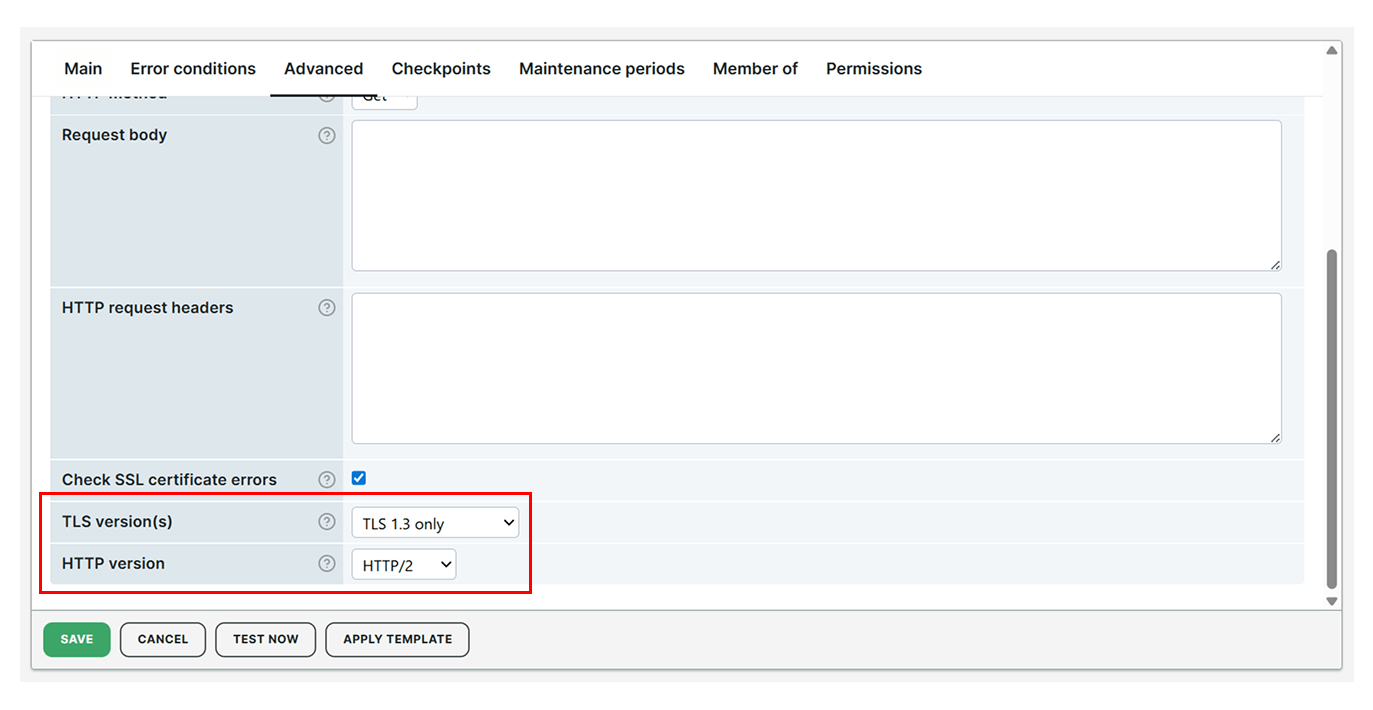
It is now possible to specify the HTTP version for each step of an MSA monitor. This lets you control which HTTP version the checkpoint servers use when making requests:

By default, the HTTP version option is unchecked, meaning the server will automatically use the highest supported HTTP version available, with a fallback back no lower than HTTP/1.1. Currently, HTTP/3 is available at selected checkpoint locations, and support will soon be expanded to additional locations.

On a similar note, the HTTP configuration allows you to select only one version, while the TLS configuration supports selecting multiple versions. This is because TLS supports version negotiation during the connection process, whereas HTTP/3 does not and requires a specific version to be defined.

HTTP version

UPDATE

APR 2025

#Maintenance periods can now be filtered

Maintenance periods can now be easily filtered by type using the dropdown menu, with options such as All periods, One time periods, or Recurring periods. You can also filter them by description using the search bar for easier access.

Filter maintenance periods

UPDATE

APR 2025

#Integrations can now be filtered

The Integrations overview page now includes a filter function for users with multiple integrations. This allows you to easily manage and search for specific integrations by name.

Filter integrations

UPDATE

MAR 2025

#New scripting methods are now available in Multi-step API (MSA) monitors

The following scripting methods can now be used in the Pre-request and Post-response scripting tabs of Multi-step API (MSA) monitors:

  • ut.crypto.cert.parseCrl(bytes) — parses a certificate revocation list and returns its metadata.
  • ut.crypto.md5(value) — generates an MD5 hash of the specified value.
  • ut.crypto.sha1(value) — generates an SHA-1 hash of the specified value.
  • ut.crypto.sha256(value) — generates an SHA-256 hash of the specified value.
  • ut.crypto.sha512(value) — generates an SHA-512 hash of the specified value.
  • ut.response.bytes — returns a byte array containing the response body. Responses are limited to 100 MB.

Note that ut.response.bytes is only available in the Post-response tab of your MSA monitor. The scripting methods for generating MD5 and SHA hashes enable you to store and send values securely, ensuring data protection through hashing.

UPDATE

MAR 2025

#API user overview updates

The API user overview now shows the number of requests for each API user over the last 30 days. This lets you identify which API users are active and which APIs are frequently used.

API requests over the last 30 days
By using the Uptrends website, you consent to the use of cookies in accordance with our Cookie Policy.